T-Mobile and John Legere aren’t having a very good day. Everyone has reacted to his reaction to accusations that their Binge On service has some pretty serious flaws. Hot takes are everywhere. It’s hella hot in the hot take department right now. If you aren’t hot-taking T-Mobile’s Binge On, then you probably should be. But don’t come with that weak hot take-ness. You need to bring extra heat to your hotter than hot, hot take of John Legere’s hot take.
This post, however, isn’t a hot take. This is something simpler. This is a quick guide on how to turn off T-Mobile Binge On and move on with life.
Ready?
- Sign-in to your account at T-Mobile’s site.
- Once signed in, click on the “Profile” button in the top right corner. If you are on mobile, you’ll need to tap the menu button in the top right corner, then “Profile.”
- Open “Media Settings.”
- Binge On should be sitting at the top of this section. Tap the toggle to “OFF.”
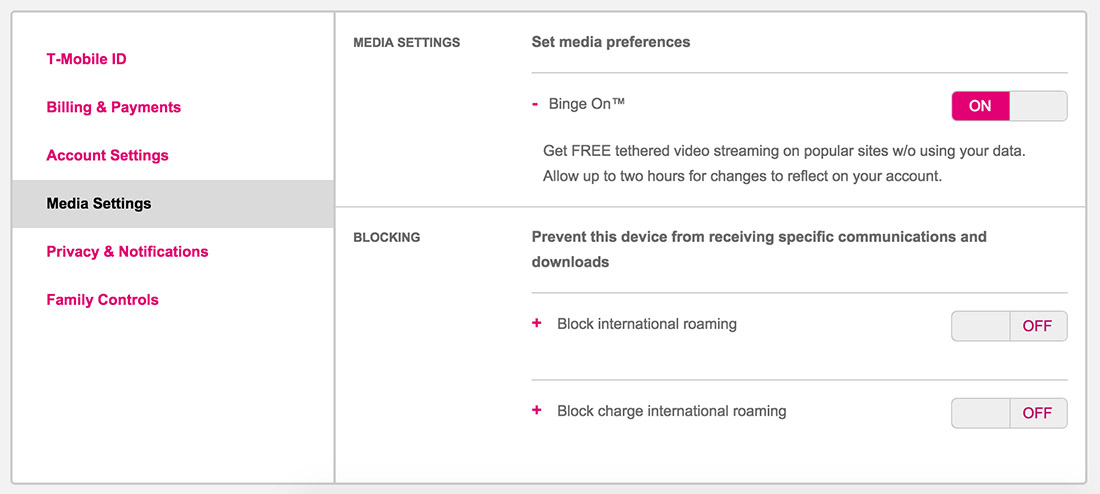
There. Now, no more throttling or downgrading or optimizing or whatever the hell else we are calling it.
Related Stories
How to: Turn Off T-Mobile’s Binge On is a post from: Droid Life
Gadget Reviews: mamaktalk.com
Car Reviews: automoview.com
Entertainment News: 38today.com
Today's Promotions: freepromotoday.com
Gossip News: 38now.com
[Recommended Post] Best natural looking Malaysian Girl - Photo Album


